🚀 Building a PHP MCP App to Publish Darkwood Articles
on March 1, 2026
Large language models are already good at generating text. What is still missing, in many projects, is a clean way to turn that text generation into a real workflow: draft something, review it, correct it, publish it, and expose the whole thing in a way that feels native inside an AI client.
That is exactly where MCP Apps become interesting.
In this project, the goal was not to build "yet another chatbot integration". The goal was to build a real MCP App in PHP that can help publish a Darkwood blog article through a small editorial workflow:
- generate a draft,
- review or correct it,
- publish it,
- and, if needed, loop back before publishing.
The result is a PHP MCP server that can run over stdio or HTTP, expose tools, expose UI resources, and be packaged as a Claude Desktop extension.
Why MCP Apps matter
A classic MCP server can expose tools and resources. That is already useful: an LLM can call a tool, get structured output, and continue reasoning.
But MCP Apps add something more practical: they let a tool bring its own embedded UI.
That changes the interaction model quite a bit.
Instead of returning only text, a tool can now open a dedicated interface inside the host. That interface can display input state, show results, guide the user through a flow, and trigger additional tool calls. In other words, the tool stops being just a remote function and starts behaving more like a focused application surface.
For an editorial workflow, that is a much better fit than plain text alone.
Generating a draft is not the hard part. The hard part is managing the transition between "here is a generated text" and "this content is ready to publish". That is where an MCP App UI helps: it gives structure to the process.
The Darkwood use case
The concrete use case here is simple to explain.
This MCP App is used to support the publication of a blog post on Darkwood.
The workflow starts with a first step, GenerateDraft, which produces an initial draft from a topic or context.
Then comes the second step, PublishDraft, which handles the publication path. If the draft is not good enough yet, the flow does not have to end there. It can go back through a correction or revision step before attempting publication again.
That loop matters.
A publication workflow is rarely linear in practice. A first draft can be too rough, too generic, too long, or simply not aligned with the editorial intent. So the MCP App is designed around a realistic idea: publishing is the destination, but iteration is part of the path.
One MCP server, several ways to use it
A useful aspect of this project is that the same MCP logic is reused across several runtime modes.
The server can be used:
- over stdio, typically for local integrations and Claude Desktop packaging,
- over HTTP, for browser-based hosts or local MCP endpoints,
- through Symfony server, when you want a more standard HTTP setup around
public/index.php, - through a Claude Desktop extension, packaged as
.mcpb, - and, in all of those cases, as an MCP App-enabled tool when the host supports embedded UI.
That is important architecturally: the business logic is not tied to one client or one transport. The transport changes, the orchestration model changes a bit, but the MCP surface remains the same.
Architecture
The easiest way to understand the project is to separate it into four roles: the host, the PHP MCP server, the MCP App UI, and the orchestration layer.
The big picture
At a high level, the system works like this:
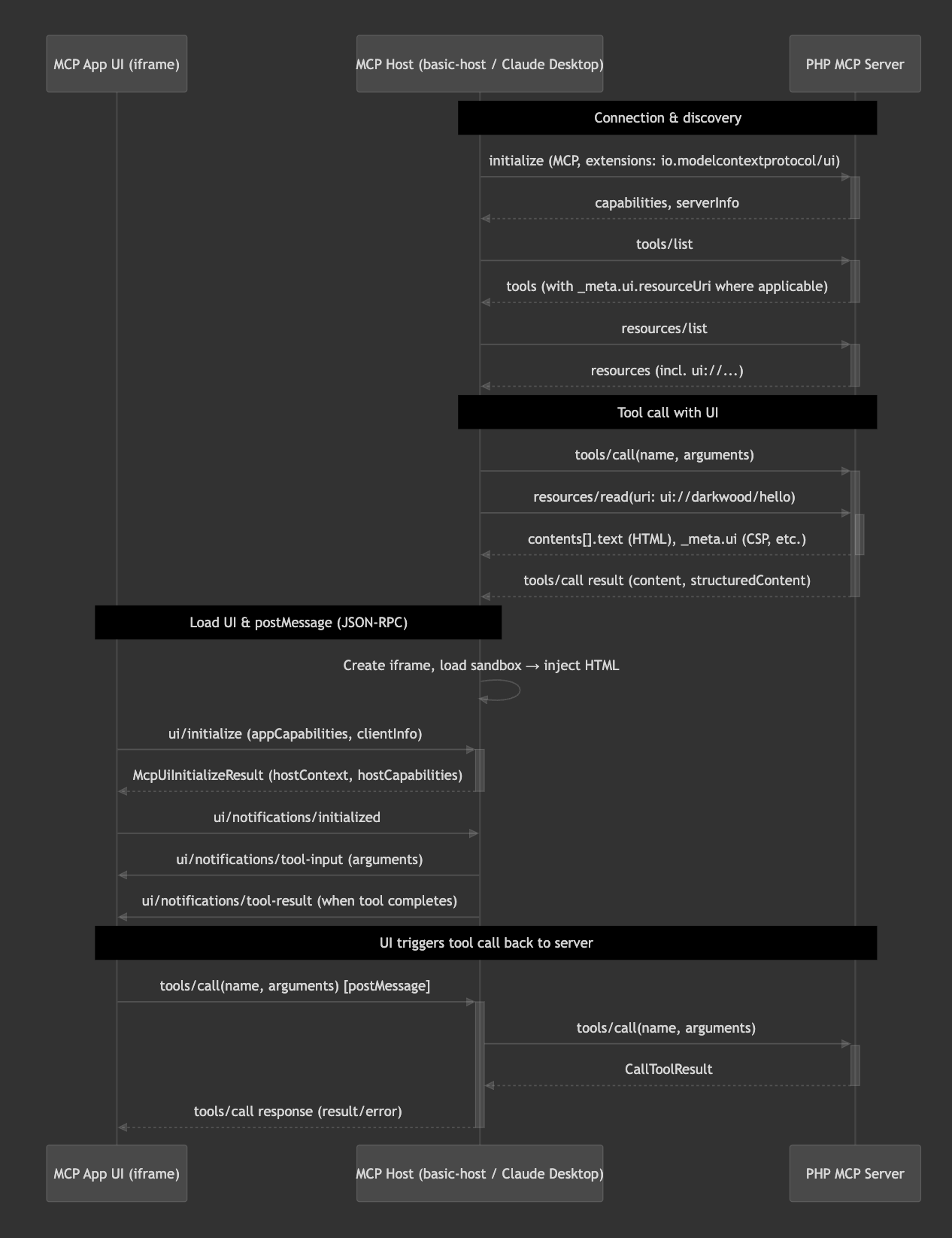
- an MCP host connects to the PHP server,
- the host discovers the available tools and resources,
- the host calls a tool such as
GenerateDraftorPublishDraft, - if the tool declares a UI resource, the host also loads the corresponding MCP App view,
- the UI and the host talk to each other through JSON-RPC over
postMessage, - and the host forwards tool calls back to the PHP server.
This is the key idea: the UI does not talk directly to the server. The host sits in the middle and acts as the bridge.
That separation is useful because it keeps the UI portable across compatible hosts while preserving a clean MCP contract on the server side.
Transports
The project supports two main transports.
Stdio
In stdio mode, the host starts the PHP server as a subprocess and communicates through STDIN and STDOUT.
This is the natural fit for Claude Desktop extensions. The host launches the server, sends JSON-RPC messages through standard input, and reads responses from standard output.
This mode is simple, local, and efficient when the client is responsible for process management.
HTTP
In HTTP mode, the server exposes an MCP endpoint such as POST /mcp.
That mode is useful for browser-oriented hosts, local testing, or any setup where an HTTP boundary is more convenient than a child process.
In this project, HTTP can be served in two ways:
- through a dedicated long-lived process such as the flow worker,
- or through a more traditional web entry point such as
public/index.php.
Messaging
Once connected, the host and the server communicate with JSON-RPC 2.0.
That means the interaction model stays clean and explicit:
- the host sends requests,
- the server returns responses,
- notifications can be exchanged when no response is expected.
This is true whether the transport is stdio or HTTP. The transport changes, but the protocol contract stays the same.
On top of that, when MCP Apps are involved, the UI communicates with the host through another JSON-RPC channel, this time over postMessage.
So there are really two communication layers:
- host ↔ server through MCP,
- UI ↔ host through the MCP Apps bridge.
That split is what makes embedded UI possible without coupling the front-end directly to the PHP runtime.
Lifecycle
A typical interaction goes through a few predictable steps.
First, the host initializes the connection and discovers the server capabilities.
Then it lists tools and resources.
When the user triggers a tool, the host calls the tool on the server. If that tool is associated with a UI resource, the host also reads the corresponding ui://... resource and renders it in a sandboxed iframe.
At that point, the MCP App becomes interactive. It can receive the tool input, display the tool result, and initiate follow-up actions through the host.
In the Darkwood workflow, that means the user or assistant can move from draft generation to publication, and possibly back into a correction loop, without leaving the MCP interaction model.
What runs where
The PHP MCP server owns the protocol surface:
initializetools/listtools/callresources/listresources/read
The MCP App UI owns the interactive experience.
The host owns transport, rendering, and bridging between the UI and the server.
The Flow layer owns workflow orchestration when orchestration is needed.
That last point matters because editorial flows often involve more than one action and more than one state transition.
Stdio, HTTP, and Symfony server are not the same thing
Even if the business logic stays the same, the runtime model is not identical across modes.
With stdio and with a long-lived HTTP worker, you can think in terms of a persistent process. That opens the door to async capabilities, event loops, and continuous orchestration in the same runtime.
With Symfony server, the model is more classic. Each request is handled in a synchronous HTTP cycle. That is usually simpler operationally, but it means orchestration should be understood differently: the HTTP layer stays sync, while the workflow logic is delegated to Flow or to external coordination.
That distinction is worth making explicitly, because "supports HTTP" does not automatically mean "supports the same execution model everywhere".
Why this design works well for publishing workflows
A blog publication flow sits in an awkward space.
It is not a single function call. But it is also not a full back-office application. It needs just enough structure to manage state and decisions, while staying lightweight enough to be triggered from an AI conversation.
That is exactly why MCP Apps are a good fit here.
The tool interface gives the model an actionable surface. The UI gives the human or the client a controlled workflow view. And the Flow orchestration gives the backend a place to manage multi-step transitions.
This combination is strong because each layer stays focused:
- the model decides when to use the tool,
- the tool exposes the workflow,
- the UI makes the workflow visible,
- the backend executes it cleanly.
Using the MCP App in Claude
One practical outcome of the project is that the same MCP server can be packaged as a Claude Desktop extension.
That means the project is not only a local prototype or a browser demo. It can actually be installed in Claude and used as a proper tool integration.
In that setup:
- the extension manifest defines how Claude launches the server,
- the server runs through stdio,
- Claude acts as the MCP host,
- and the MCP App becomes available as a tool inside the client.
This is a good example of why keeping transports separate from business logic matters. The same PHP MCP server can serve local development, HTTP-based experimentation, and Claude Desktop usage without rewriting the core behavior.
From demo to real editorial tooling
What makes this project interesting is not the existence of yet another draft generator.
It is the fact that the project already defines a reusable shape for editorial tooling:
- a tool to produce a draft,
- a tool to publish,
- a place to handle revisions,
- a UI layer to support the interaction,
- and a transport-agnostic MCP server underneath.
That is a much more durable foundation than a one-off prompt chain.
Once that structure exists, improving the workflow becomes much easier. You can refine generation quality, enrich publication metadata, add validation, or plug into a real CMS. The contract between the host, the UI, and the server remains stable.
Opensource
The full project is available as an open-source repository on GitHub
https://github.com/darkwood-com/darkwood-publish-article-mcp-apps
Sources
This article was based from Francois Zaninotto linkedin post.
Conclusion
This project shows that MCP Apps are not only about exposing tools to an LLM. They are about exposing usable workflows.
In the Darkwood case, the interesting part is not that PHP can talk MCP. The interesting part is that a PHP MCP server can now act as the backend of a small editorial application, available inside an AI client, with both tool semantics and embedded UI.
That moves the integration from "the model can call a function" to "the model can participate in a controlled publishing workflow".
And that is a much more useful place to be.
Sources
MCP Apps Quickstart
README.md
php-mcp-apps-mvp-architecture.md